Brochure Printing

Brochure Printing — Bi-Fold, Tri-Fold & More

Brochure Printing — Folded, Professional, and Built to Represent Your Brand

A well-designed brochure does something a flyer or postcard can't — it unfolds. That physical reveal creates a reading experience that holds attention, communicates depth, and leaves an impression that single-sheet marketing rarely achieves. Whether you're introducing a business, detailing a service menu, or handing something to a prospective client that speaks for you after the meeting ends, Printkeg produces brochures on premium paper stocks with full-bleed color and fast turnaround.

Brochure Sizes & Fold Types

We offer two base sheet sizes and multiple fold styles — each creating a different reading experience and information layout. Choosing the right combination depends on how much content you need to present and how the brochure will be distributed.

Trifold Brochure — 8.5×11"

Folds into three panels  |  Six printable surfaces

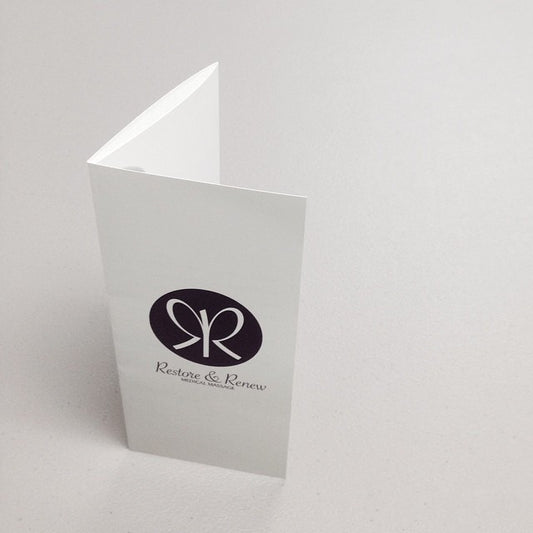
The most universally recognized brochure format. Folds into thirds, fits neatly in a standard rack display, and slips into a pocket or purse without bulk. Six printable panels give you room to organize content clearly — cover, inside spread, and back panel — without feeling crowded. The default choice for service menus, product overviews, and customer-facing information pieces.

Best for: Service businesses, restaurants, healthcare providers, real estate, and any organization that needs to communicate multiple categories of information in a compact, self-contained format.

Half-Fold Brochure — 8.5×11"

Folds in half  |  Four printable surfaces

A single fold produces a four-panel booklet-style layout. Simpler than a trifold, with more generous panel space for images, headlines, and white space. The half-fold reads more like a small magazine or program than a traditional brochure — appropriate for more polished, editorial-style presentations.

Best for: Event programs, lookbooks, company profiles, and any project where open visual space and a premium feel matter more than information density.

Half-Fold Brochure — 11×17"

Folds in half  |  Four printable surfaces at a larger scale

The same half-fold format on a tabloid sheet — producing four panels at 8.5×11" each. More room for large photography, detailed layouts, and content-heavy presentations without feeling cramped. The format of choice when your brochure needs to look as impressive as it reads.

Best for: Annual reports, product catalogs, portfolio presentations, and premium client-facing materials where the scale and weight of the piece make a statement.

Z-Fold & Gatefold

Specialty folds  |  Specify at checkout

Z-fold (accordion-style) and gatefold (two panels opening to reveal a center spread) are available for projects that need a more distinctive physical experience. The gatefold reveal in particular creates a dramatic moment — two outer panels open to expose a full interior spread. Specify your desired fold type in the order instructions at checkout.

Best for: Product launches, premium marketing materials, invitations with a reveal element, and any project where the act of opening the brochure is part of the design intention.

Paper Stocks for Brochure Printing

Paper weight and finish affect how a brochure feels in the hand — which directly affects how it's perceived. A brochure that feels thin and flimsy undermines the message it carries. Here's how to match the right stock to your project.

100# Gloss Text

The standard production stock for trifold brochures. Heavier than the typical 80# flyer stock, with a coated gloss surface that reproduces color with excellent saturation and sharpness. Substantial enough to feel professional without rigidity — it folds cleanly and holds its shape. The cost-effective choice for high-volume brochure runs and budget-conscious organizations that still want a quality result.

Best for: Restaurants, service menus, retail promotions, and any high-volume brochure application where cost-per-piece matters.

80# Gloss Text

A lighter gloss text stock that brings per-unit cost down further on large runs. Still coated, still vibrant — appropriate for situations where you're distributing at volume and the brochure's primary job is to communicate information rather than impress with its physical quality. A practical choice for event handouts, trade show distribution, and community programs.

Best for: High-volume event handouts, community outreach, and any project prioritizing quantity over premium feel.

100# Matte Text

A coated matte surface with a refined, non-reflective finish. Reads as more sophisticated and editorial than gloss — appropriate for brands that want their materials to feel considered rather than promotional. Colors print slightly softer than on gloss but the overall presentation is polished and gallery-appropriate. Especially effective for brochures with significant white space and typographic-forward layouts.

Best for: Professional services, design studios, premium retail, healthcare, and any brand where elegance matters more than color punch.

70# Matte Card

Despite the lower pound weight, card stock carries a stiffer feel than text-weight matte — it holds its shape, resists limpness, and communicates quality immediately when someone picks it up. The premium option for organizations that want their brochure to feel closer to a fine print piece than a marketing handout. A distinctive choice that most competitors don't offer at standard brochure pricing.

Best for: Premium businesses, boutique brands, financial services, luxury retail, and any organization for whom the weight of the brochure in the hand is part of the brand statement.

The Technology Behind Brochure Printing

We use two distinct production methods matched to the demands of each brochure format — not a one-size-fits-all approach that compromises quality for convenience.

High-End Digital Toner Presses

Our 11×17 and 8.5×11 half-fold brochures are produced on high-end toner-based digital presses. These presses deliver vibrant, consistent color across the sheet — especially effective for photography-heavy layouts and designs with large color fields that need to hold evenly edge to edge.

Used for: Half-fold brochures in both sizes.

Offset Printing

Trifold brochures are produced using offset printing on 100# text stock — the production standard for high-volume commercial brochure printing. Offset delivers superior color consistency and ink coverage for runs where every piece needs to look identical, with the color accuracy that digital presses can't always match at scale.

Used for: Trifold brochures.

Brochure Design Services

Don't have a print-ready file? Our in-house design team can build a custom brochure from scratch. We create unique, brand-aligned designs that organize your content clearly, apply your visual identity consistently, and set up your file correctly for print — including proper bleed, fold lines, and panel layout. If you have existing brand assets (logo, colors, photography), bring them. If you're starting from zero, we can help with that too.

Contact us before placing your order to discuss your project and get a design quote.

File Setup for Brochure Printing

Brochure files are more complex than flat prints because panel placement and fold lines have to be accounted for in the document layout. Here's what you need to know.

Resolution: 300–600 DPI

300 DPI at your finished brochure dimensions is the standard minimum. For brochures with small body text, fine detail, or intricate graphics, 600 DPI produces noticeably crisper output. Set your resolution from the start — upscaling a low-resolution layout file introduces softness that no prepress adjustment can correct.

Color Mode: CMYK

All brochures are printed in CMYK. Design your layout in CMYK from the start for the most accurate color match between your screen and the finished print. Pay particular attention to rich blacks in body copy — use a single-channel black (0C 0M 0K 100K) for text rather than a four-color build, which can cause registration issues on small type.

Bleed & Panel Setup

For a standard 8.5×11 trifold, your flat file should be submitted at 8.627" × 11.127" to account for bleed. Use our downloadable templates to confirm exact panel widths and fold line placement before building your layout — panels in a trifold are not equal thirds; the inner panel is slightly narrower to fold cleanly without buckling. Download templates from the product page before designing.

File Format: PDF Preferred

Submit a print-ready PDF with fonts embedded and all linked images included at full resolution. PDF preserves your layout, typography, and color values most reliably through our prepress workflow. JPG, TIFF, and EPS are also accepted. Avoid submitting native application files (InDesign, Illustrator, Photoshop) — missing fonts or unlinked assets in native files delay production.

Brochure layouts are the most complex file type we handle — panel widths, fold direction, bleed, and safe zones all interact. If you're not sure your file is set up correctly, our internal design team can adjust your artwork before production. Submit what you have and we'll tell you exactly what needs fixing before a single sheet goes to press.

How Brochure Orders Work

Configure & Upload

Select your size, fold type, paper stock, and quantity. Upload your print-ready PDF and complete checkout. Specify your fold type in the order instructions if selecting a specialty fold.

Design Team Review

Our team inspects your artwork for resolution, bleed, color mode, and panel layout. If anything needs adjustment, we contact you by email with specific guidance before production begins.

Production

Production takes 3–4 business days after artwork approval. You'll receive email updates with production status and estimated ship date throughout the process.

Delivery

Your brochures ship with tracking. Total time from order to doorstep is approximately one week for standard production and shipping. Rush options may be available — contact us for tight deadlines.

"Very happy with the results. The brochure I had printed was much less expensive at Printkeg, arrived quickly, and was done perfectly. Thank you."

Brochure Printing FAQ

What paper do you use for trifold brochures?

Trifold brochures are printed on 100# Gloss Text as the standard stock — slightly heavier than the 80# text stock used for standard flyers, with a coated surface that handles color well. This stock is not the same as "cover" or "card" stock — it's a text-weight coated paper that folds cleanly and feels substantial without rigidity. Additional paper options including matte and heavier card stocks are available depending on your project requirements.

What fold types are available?

We offer trifold (letter fold), half-fold, z-fold (accordion), and gatefold. Trifold and half-fold are available as standard product options. Z-fold and gatefold are available on request — specify your desired fold type in the order instructions at checkout. If you're unsure which fold suits your layout, contact us before ordering and we'll help you choose.

How do I set up a trifold brochure file?

A trifold brochure is a single flat sheet that folds into three panels. The key thing most designers miss: the panels are not equal thirds. The innermost panel (the one that folds in) must be slightly narrower — typically about 1/16" narrower than the other two — so it folds cleanly without buckling. Download our templates from the product page before building your layout. For an 8.5×11 trifold, your flat file including bleed should be submitted at 8.627" × 11.127".

How long does brochure printing take?

Production takes 3–4 business days after artwork approval. Add shipping time based on your location and chosen shipping method for a total of approximately one week door to door under standard conditions. Rush production may be available for urgent deadlines — contact us before ordering if you have a specific event date you're working toward.

What file types do you accept for brochures?

Print-ready PDF is strongly preferred — it preserves your layout, embedded fonts, and color values through our prepress workflow most reliably. JPG, TIFF, and EPS are also accepted. Avoid submitting native application files (InDesign packages, Illustrator AI files, Photoshop PSDs) — missing fonts or unlinked images in native files cause production delays. If you only have a native file, contact us before submitting.

Can you design my brochure for me?

Yes. Our in-house design team creates custom brochures from scratch — brand-aligned, print-ready, and set up correctly for the fold type and paper stock you're ordering. If you have existing brand assets (logo, colors, photography, copy), bring them. If you're starting from zero, we can help develop a direction. Contact us before placing your order to discuss your project and receive a design quote.

Can you adjust my artwork if something is off?

In most cases, yes. Our design team reviews every brochure file before production and can make minor adjustments — repositioning elements within the safe zone, correcting bleed, adjusting panel widths for fold accuracy. If your file has significant issues, we'll contact you by email with a clear description of the problem and your options before anything is printed. We'd rather take the time to fix it than produce something that doesn't match your design intent.

Order Your Brochures Today

Choose your size, fold type, and paper stock — then upload your file and let our team handle the rest. Whether you're producing a polished company overview on 70# matte card or a high-volume service menu on 100# gloss text, Printkeg delivers professional brochure printing with the quality and turnaround that small businesses and independent professionals actually need.